The most powerful
crypto tool on the market.
Read the macro backdrop, know the bias and the volatility, find the level — Hidden Order Blocks and market structure — refine it in CT Charts, take the entry, and let the journal fill itself for the weekly review. One workspace. The scanners never stop.
One month free · No card required · Then US$49/month, your call
Levels are everywhere.
Evidence isn't.
Every indicator will draw you a box. None of them tell you which box is worth your attention tonight, how far away it is, or what the volume, structure and macro backdrop say about it. So you flick through forty charts and trade the one you happened to be looking at.
Forty charts, one opinion
Scroll the watchlist, eyeball each chart, trust whichever level you drew last. The best setup of the day is usually on a chart you never opened.
Confluence by memory
Volume on one tab, structure on another, macro somewhere in a group chat. Nothing sits next to the level it is supposed to support.
One ranked list, evidence attached
The scanners run while you sleep. You open the Terminal to a shortlist of the strongest levels near price, each one carrying its volume, structure and macro read. Then you open the chart.
Real screens. One question each.
Captured from the member workspace on 4 November. Every module answers a single question before you open the chart.
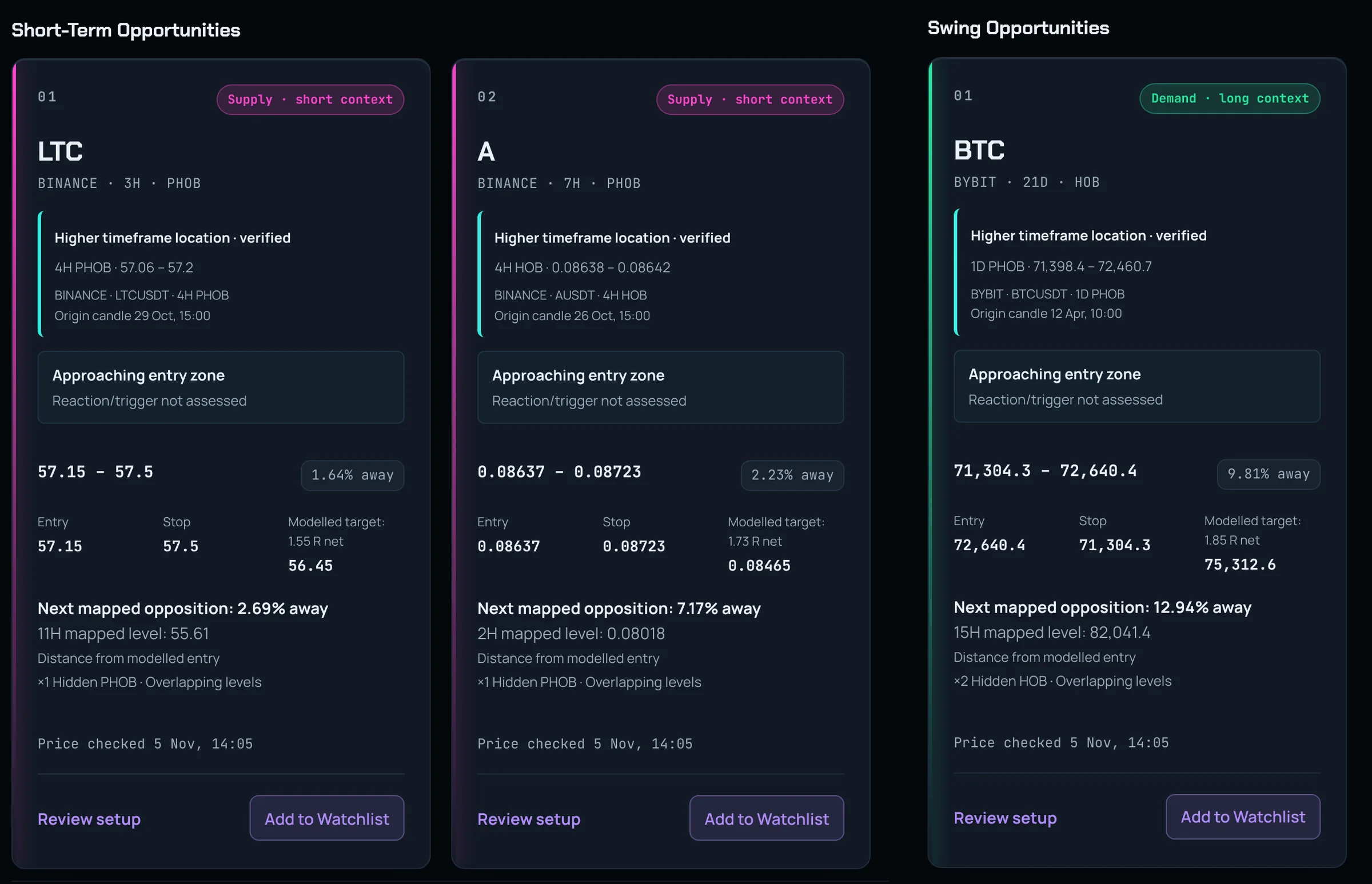
Short-term and swing, with the plan already modelled.
Two boards on the Overview, refreshed as price moves. Short-term takes 1H to 24H HOBs, swing takes 1D to 12W. Each card shows where the level sits on the higher timeframe, the entry zone, a modelled entry, stop and target in R, and the next mapped opposition. Setups that fight the macro backdrop are flagged before you set an alert.
- ▸Only complete plans with room to the next level are shown
- ▸Review setup sends it straight to the Journal
- ▸Add to Watchlist for a Telegram alert at the zone
Want more? Every level near price, every market.
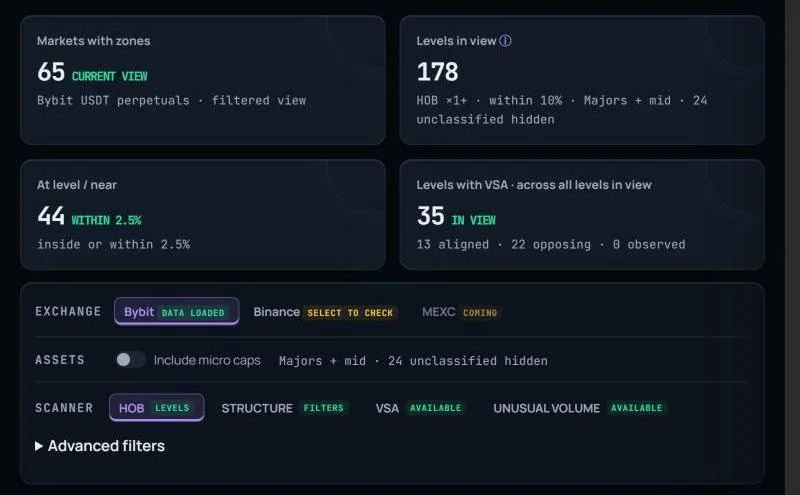
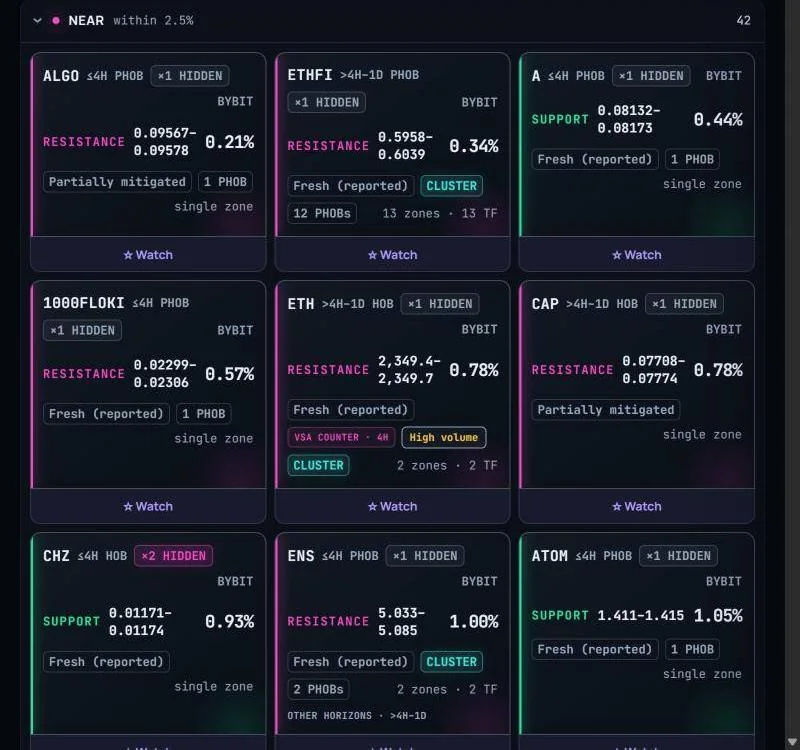
Every Hidden Order Block from the 1-hour up to the 12-month, including the hidden ones stacked inside: a ×2, ×3 or ×4 HOB carries two, three or four more blocks beneath the visible one. There is no cap: ×5, ×6 and beyond are counted too. Ranked by formation strength, distance and cluster. Support edges green, resistance edges magenta, so you read the board in a glance.
- ▸Radar, Results, Developments and Asset Matrix views
- ▸Hidden multiplier on every level: ×2, ×3, ×4 and beyond, no cap
- ▸1H to 12M timeframes, fresh vs partially mitigated, PHOB counts
- ▸Save any level to your watchlist with one click
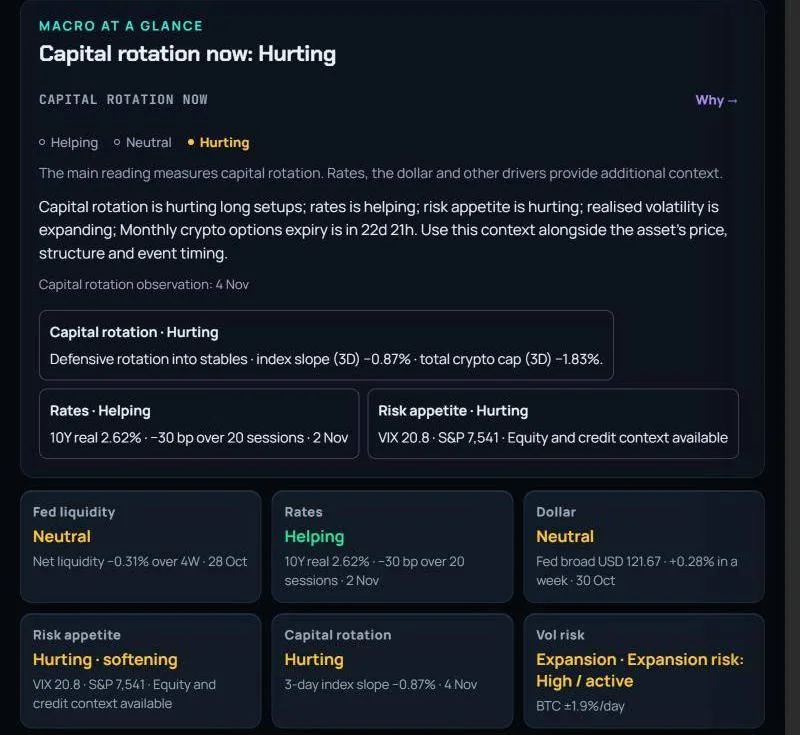
Does the environment support the trade?
Capital rotation, rates, dollar, risk appetite and volatility risk in plain words: helping, neutral or hurting. The next three events that could reprice risk sit right underneath, in your timezone.
- ▸Quick Read for the headline, Desk View for the inputs
- ▸Every reading stamped with its source date
- ▸Observation windows around conferences, expiries and FOMC
The volatility charts you lost. Rebuilt.
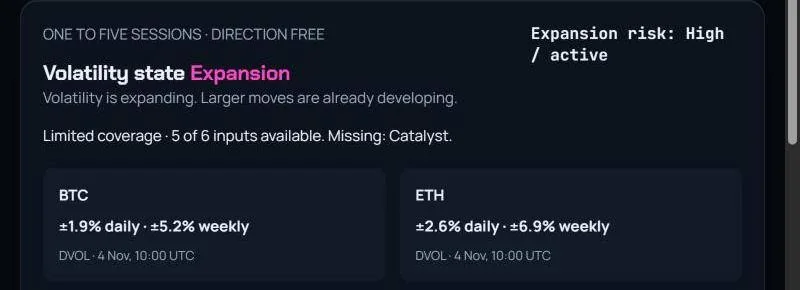
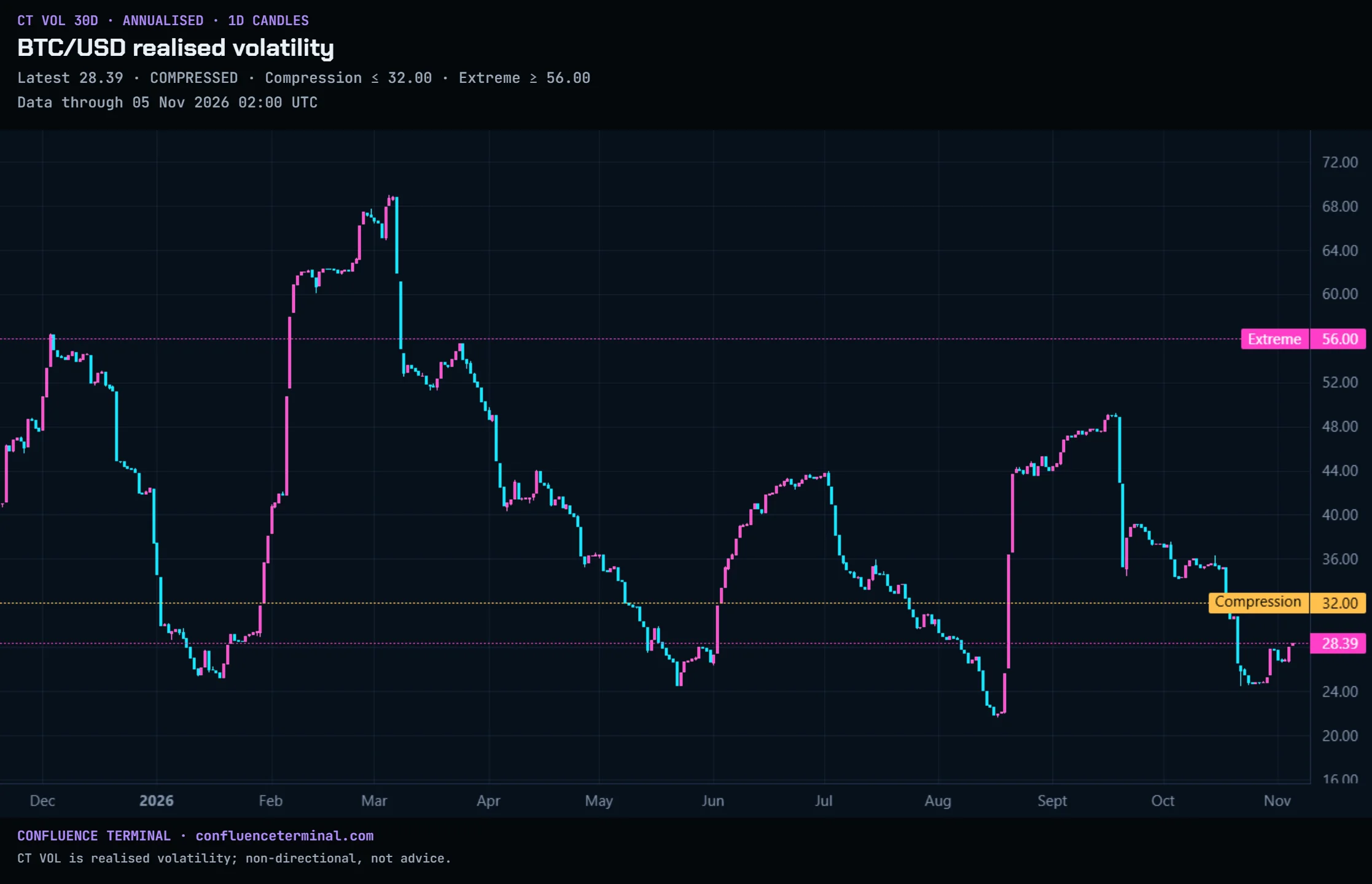
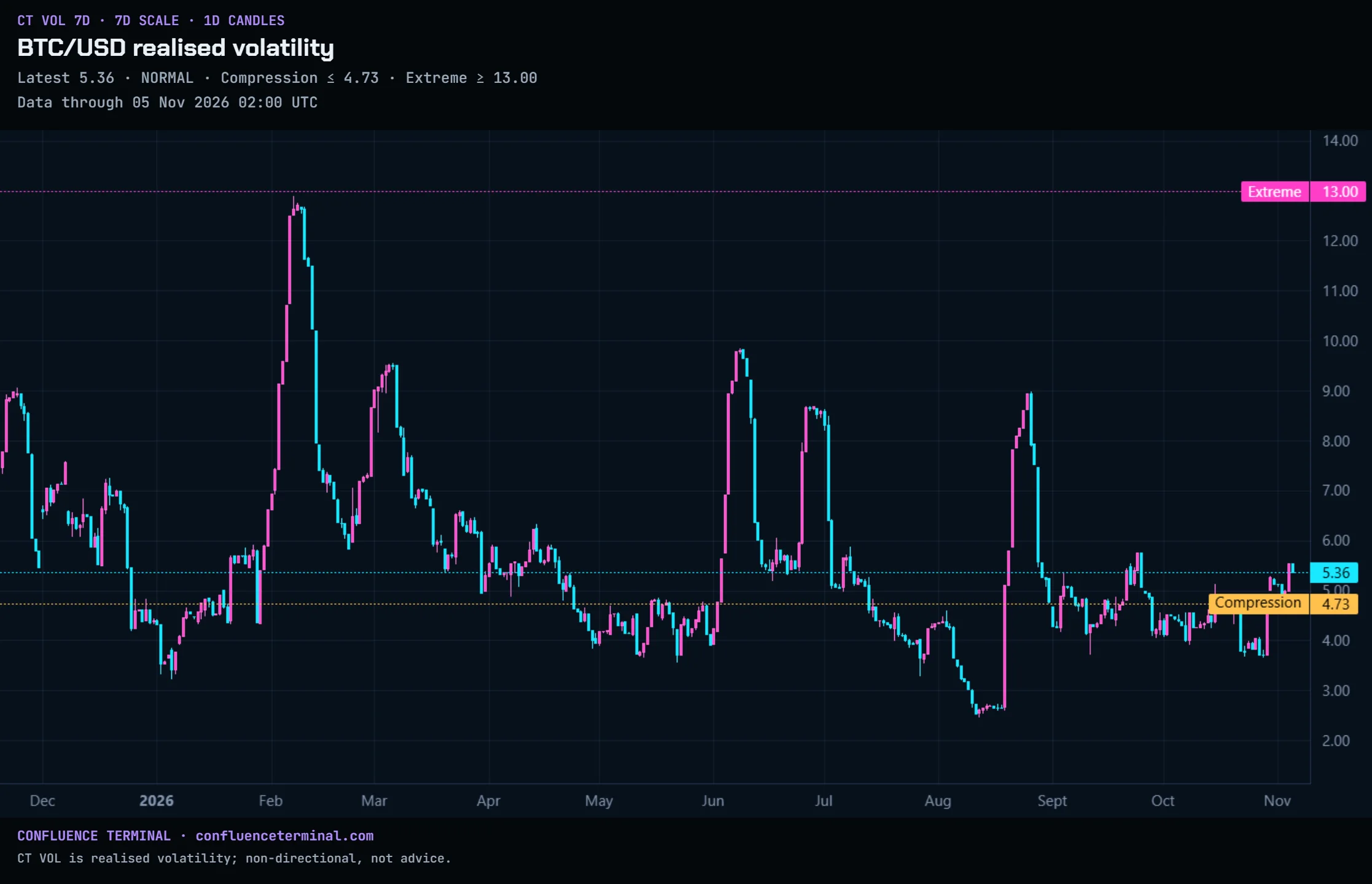
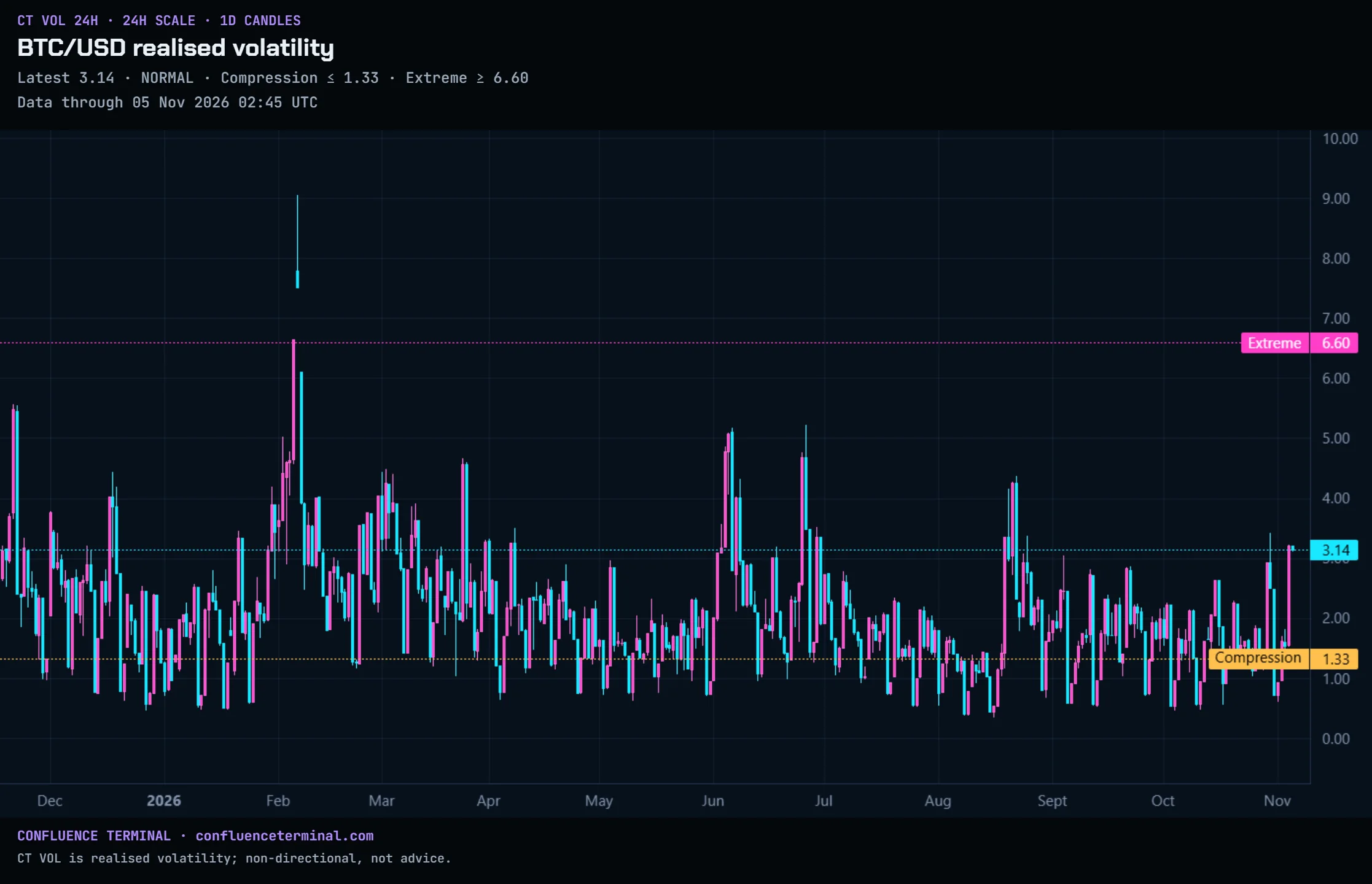
When the BVOL indices disappeared, every trader who leaned on volatility context lost the chart overnight. Confluence Terminal rebuilt the full family: 30-day, 7-day and 24-hour realised-volatility candles with compression and extreme thresholds, plus DVOL, VIX and premium alongside.
- ▸One volatility state — Compression, Normal, Expansion — from all inputs
- ▸Expected daily and weekly ranges for BTC and ETH
- ▸4H to 1M candles, three years of history, Share to X
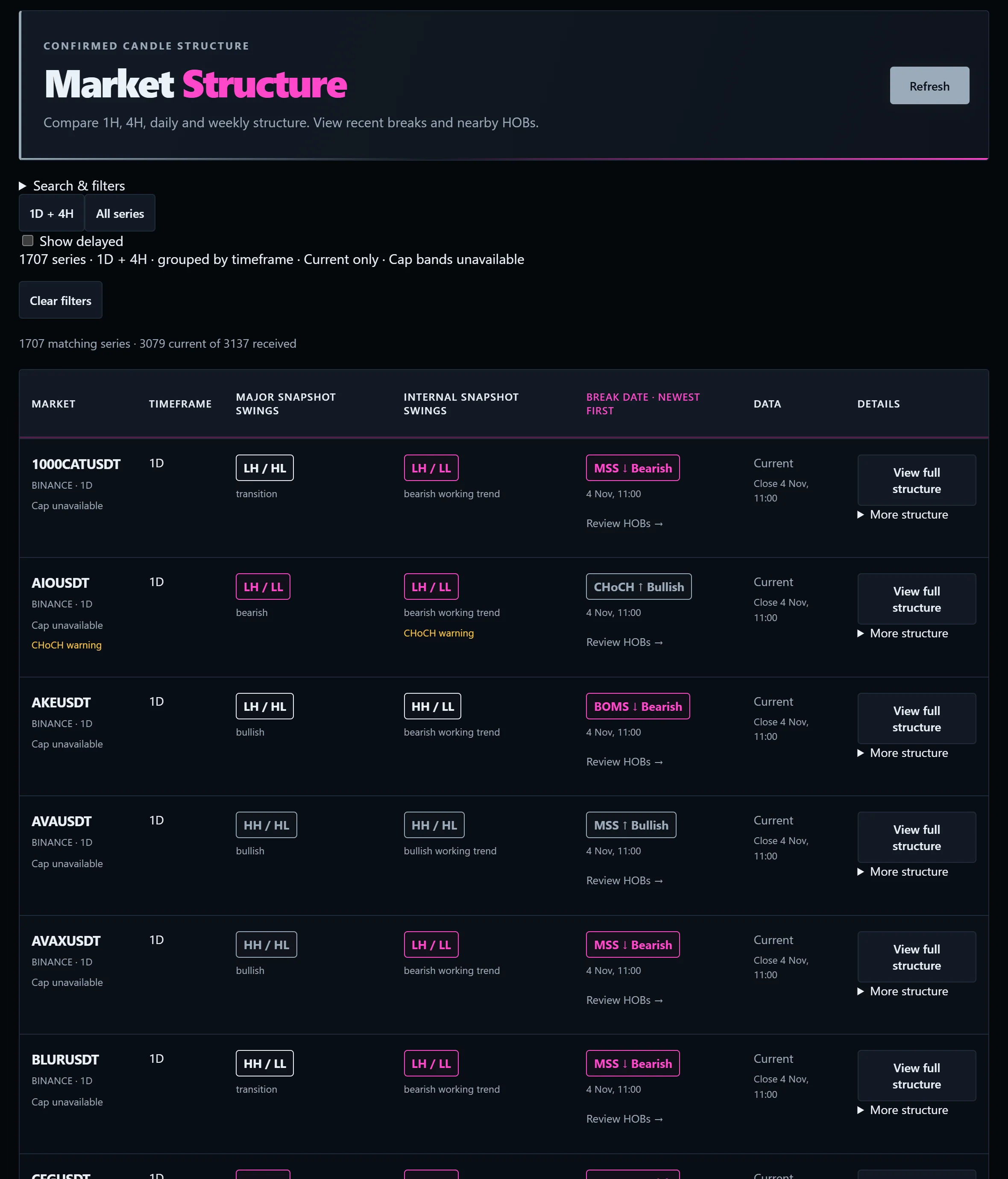
Which way is it leaning?
1,707 series across 1H, 4H, 1D and 1W. Major and internal swings, MSS, BOS and CHoCH breaks, each stamped at the confirmed close with the nearby HOBs one click away.
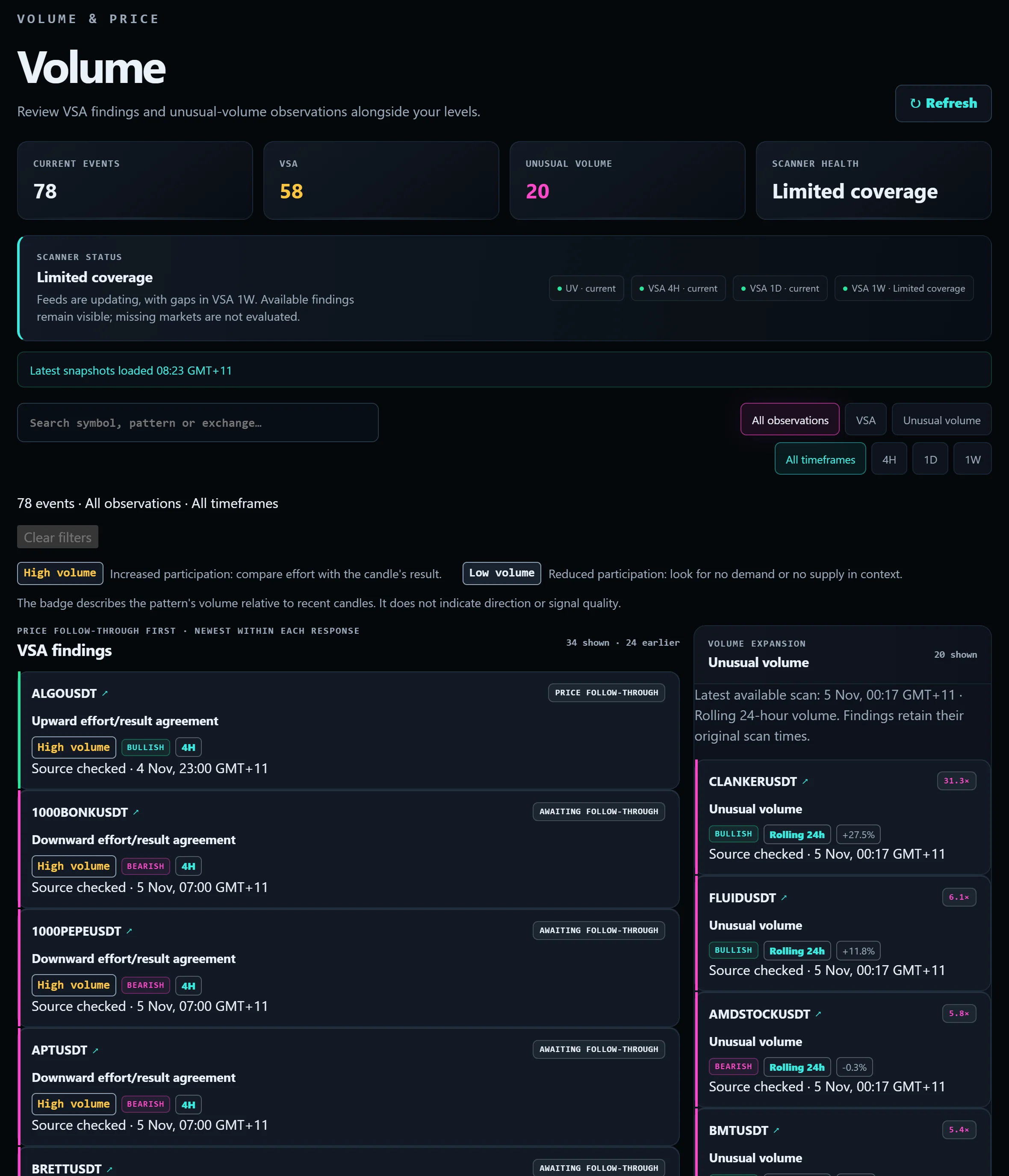
Is the effort matching the result?
VSA findings with effort-versus-result agreement and price follow-through, next to a rolling unusual-volume scanner, so the volume evidence sits beside the level it supports.
When is the next low due?
Projected low windows for 21 crypto assets and the main macro series, on one timeline.
A window is a projection. It does not confirm a low.
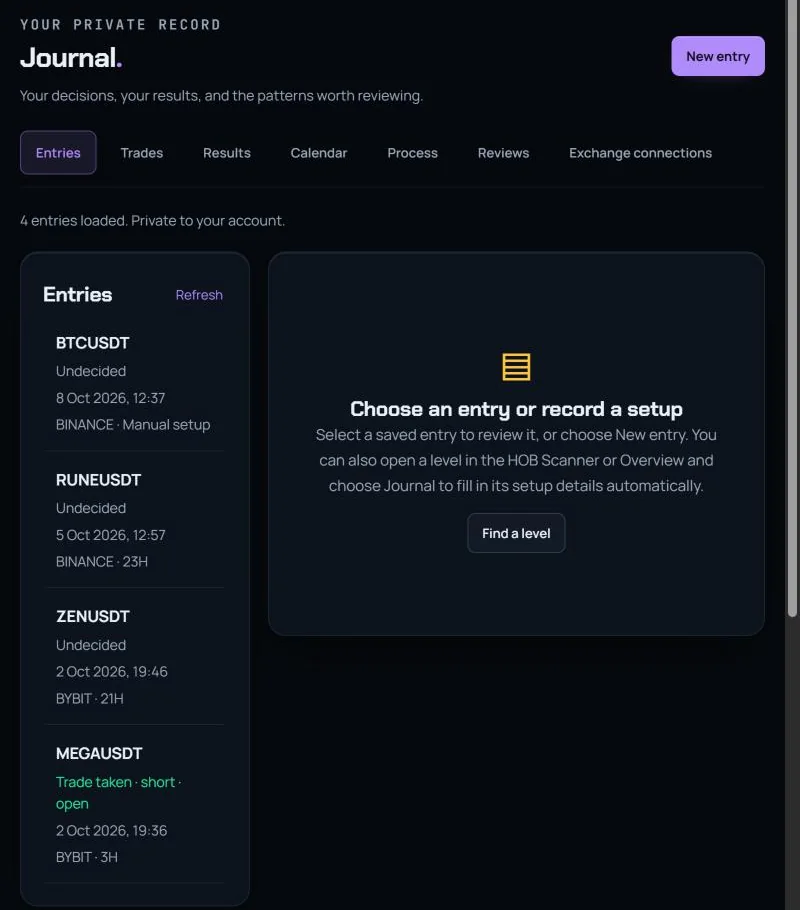
What do you actually do at levels?
Capture a setup straight from the shortlist or scanner, add execution notes, and review results by setup, timeframe and process. Private to your account, with exchange connections for imports.
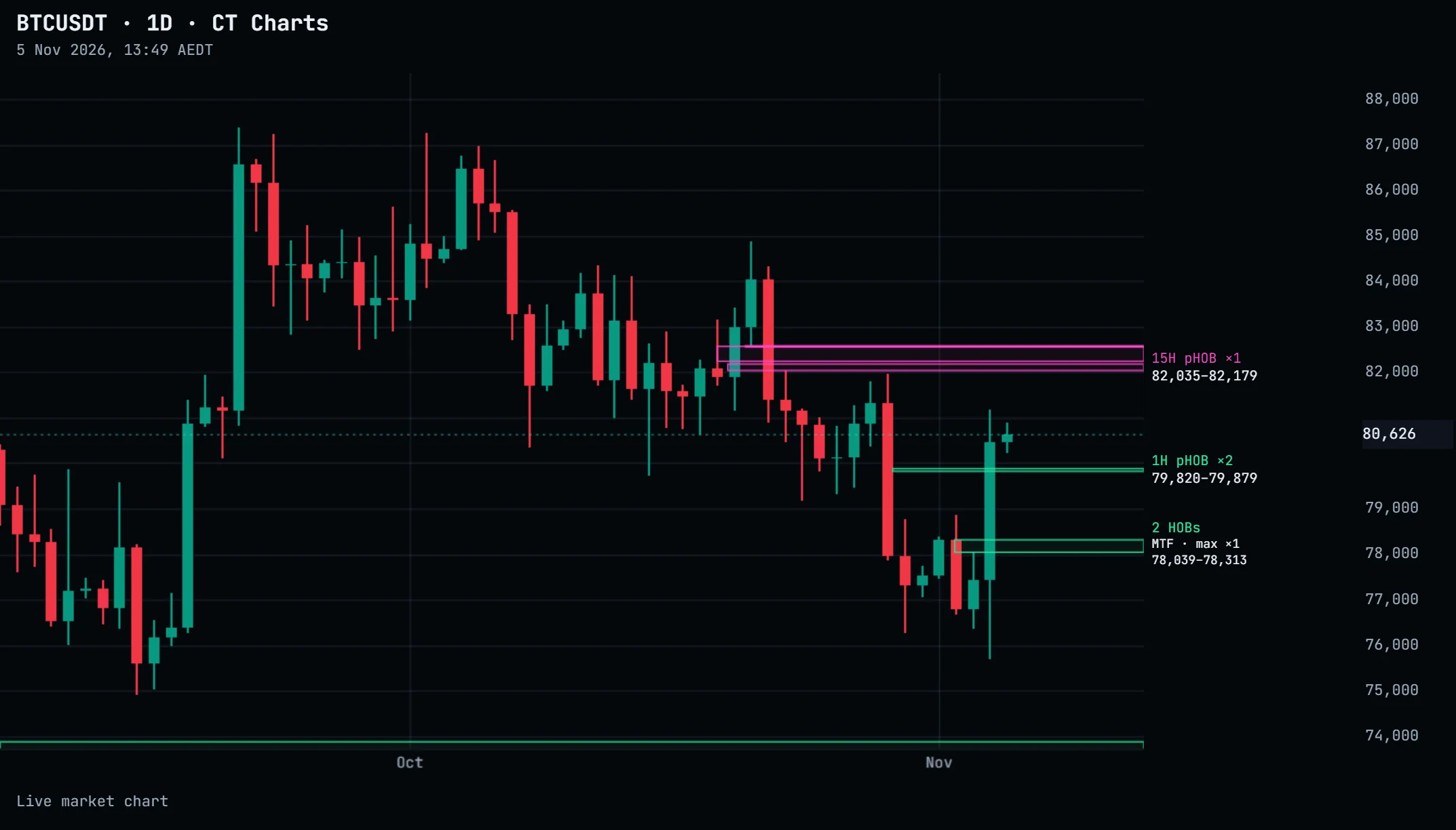
Read price, HOBs and structure on one chart.
Turn on Hidden Order Blocks and market structure to see them overlaid on price. Plan the position, capture it to the Journal, share the PNG to X.
- ▸HTF, MTF and LTF level sets you can toggle
- ▸Market structure and major swing levels
- ▸Drawings saved in your browser
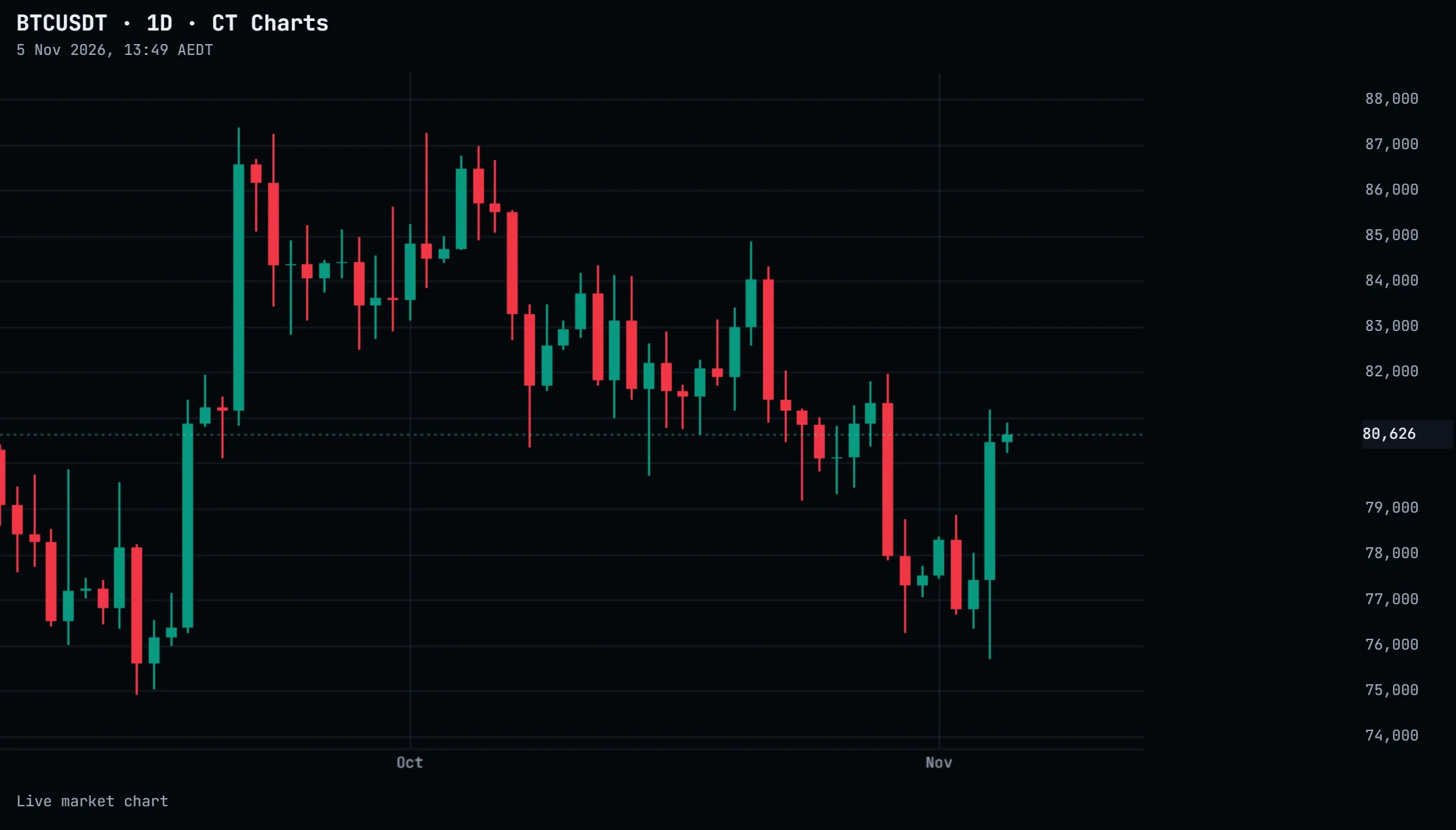 1 · Market candles2 · HOBs on
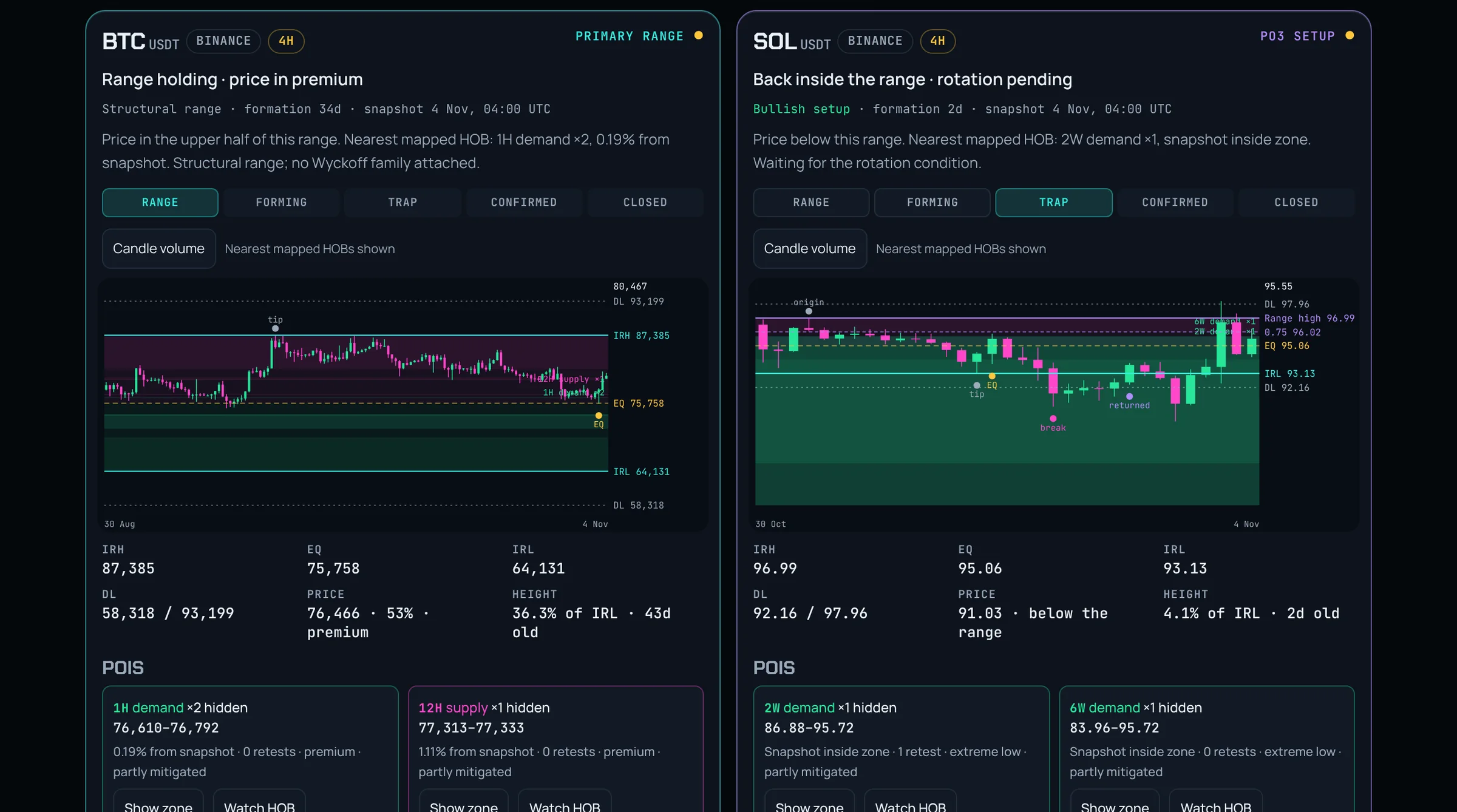
Every confirmed range, with the HOBs inside it.
Ranges are found for you on 4H, daily and weekly: the range high, equilibrium and low, the deviation limits either side, the outer PO3 state, and a stage track from forming through trap to confirmed. The points of interest inside each range are the scanner's HOBs, so the level you would trade is already on the card.
- ▸Ranges, Setups and Closed views with outcomes kept
- ▸Filter by stage, setup direction, Wyckoff model and HOB proximity
- ▸Bybit and Binance now, MEXC next
From the level to the review.
Four steps, one workspace. Nothing typed twice, nothing lost between tabs.
Find the level
Hidden Order Blocks from 1H to 12M, with uncapped hidden multipliers (×2, ×3, ×4 and beyond), ranked by formation strength, distance and cluster evidence.
Check the evidence
Volume, structure, cycle position and macro backdrop sit beside the level, each stamped with its source time.
Set the alert
Save the level to your watchlist. Get told on Telegram when price arrives, volume spikes or structure breaks.
Review the decision
Capture the setup into your private Journal straight from the shortlist. See what you actually do at levels.
One plan. A month to decide.
The whole Terminal, every module, every expansion as it ships. Try it for a month with no card on file. If it earns its place, continue for US$49 a month.
Your market workspace
- ✓HOB Scanner across Bybit and Binance
- ✓VSA and unusual-volume intelligence
- ✓CT VOL volatility charts
- ✓Structure, cycle and macro research
- ✓Watchlists and Telegram alerts
- ✓Private Journal and review tools
- ✓Every new module as it ships
- ✓Support from the Confluence Terminal team
NO PROMO CODE · ADD PAYMENT DETAILS ONLY IF YOU WANT TO CONTINUE · SEVEN-DAY REFUND ON YOUR FIRST PAID CHARGE · CANCEL ANY TIME
Two months on us
The same Terminal, paid once. Works out to about $41 a month and saves $98 against monthly. Billed upfront, no free-month offer on annual.
Choose annualBefore you ask.
Do I need TradingView?
No. Research, watchlists, alerts and the Journal all run inside the Terminal. Chart links open TradingView if you use it; its own plan rules apply there.
Which markets?
Validated Bybit and Binance perpetuals, scanned continuously, with MEXC coming. A new feed is only switched on after it passes validation.
Do you give trade calls?
No. The Terminal shows you where the levels and the evidence are, ranked. What you do with that is yours.
What happens after the free month?
Access ends unless you add payment details and continue at US$49/month. Nothing is charged automatically because there is no card on file.
What does Early Access mean?
The module is live for members and still growing. You get it now, and every expansion as it ships, for nothing extra.
Can I cancel or get a refund?
Cancel any time from Account & Billing. Your first paid charge has a seven-day, no-questions refund window — select Request refund, no email needed.
What the Terminal doesn't do.
Research, not execution. Knowing the edges is part of knowing the tool.
- Place, change or close a tradeNEVER
- Ask for exchange API keys with trading permissionsNEVER
- Send signals, trade calls or copy tradesBY DESIGN
- Claim to see institutional orders — a Hidden Order Block is a price-pattern observationHONEST
- Treat a review score as a win probabilityIT ISN'T